Building Split-It: My First Custom MCP Server
It started with a Lonavala trip
Every friends' trip ends the same way. Someone paid for the hotel, someone else paid for dinner, a third person paid for the cab, and on the drive back the WhatsApp group fills up with "bhai, how much do I owe?"
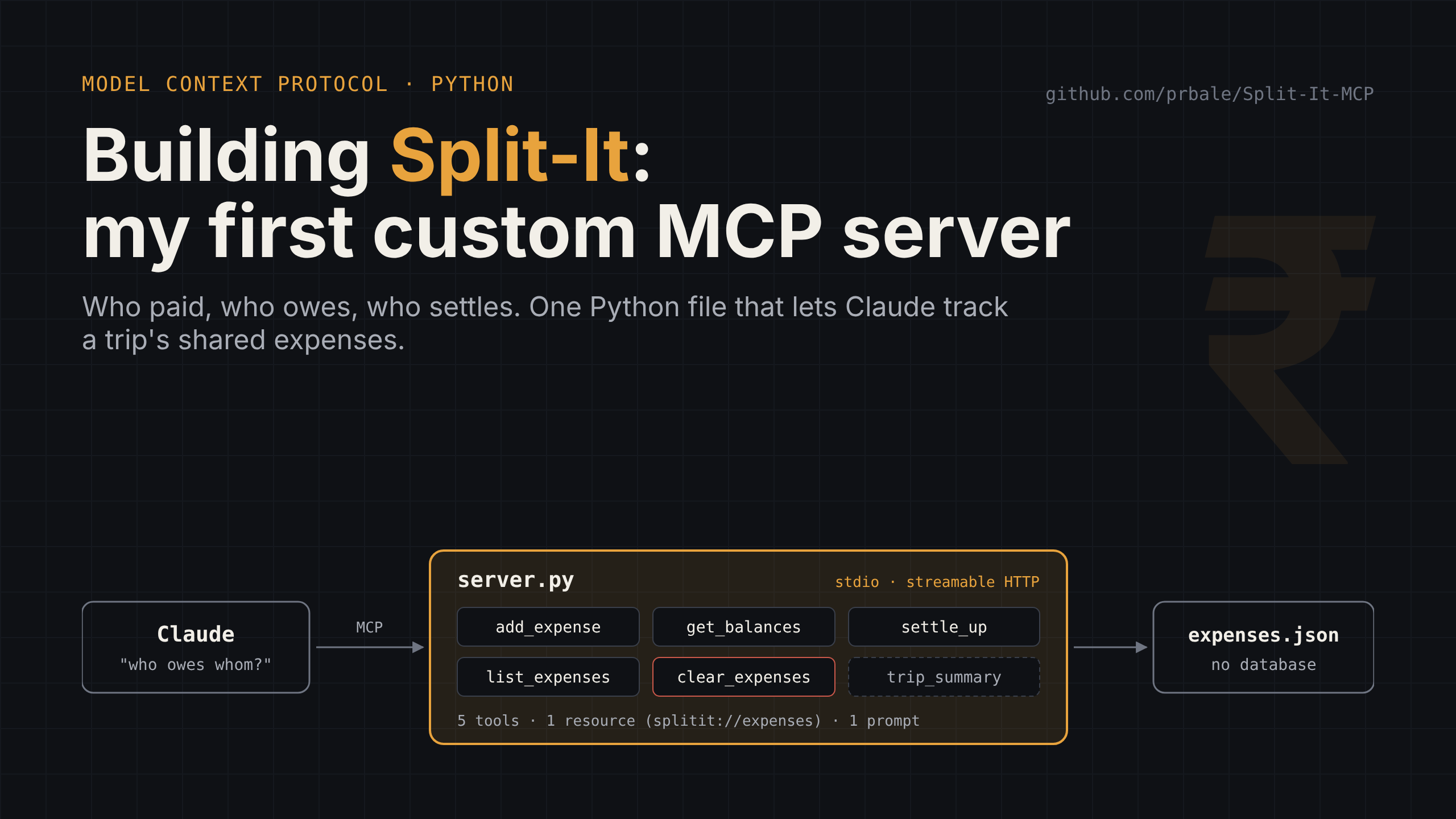
I wanted to learn MCP (Model Context Protocol) by building something, so I picked the most boring, relatable problem I could think of and built a server for it: Split-It. You tell Claude who paid for what, and it tells you who owes whom.
It's one Python file, under 200 lines including comments. No database, no framework beyond the official SDK. And it taught me more about MCP than all the diagrams I'd looked at.
Code is here if you want to follow along: github.com/prbale/Split-It-MCP
MCP in plain words
An LLM on its own can talk, but it can't do anything in your world. It can't read your expense list or write to it. MCP is a standard way to give it that reach.
You write a small server. The server says "here are the things I can do" in a format any MCP client understands. Claude Desktop, Claude Code or a claude.ai connector picks it up, and the model decides when to call what.
Coming from Android, the closest mental model I have is an AIDL interface or a bound service. You publish a contract, the other side discovers it and calls into it. The difference is that the caller here is a model reading your descriptions, not a developer reading your Javadoc. That one difference changes how you write the code, as I found out.
An MCP server can expose three kinds of things:
- Tools: functions the model can call (add an expense, get balances)
- Resources: read-only data with a URI (the full expense list)
- Prompts: reusable instructions a user can pick from a menu ("summarise the trip")
Split-It uses all three, which is exactly why I chose such a small problem.
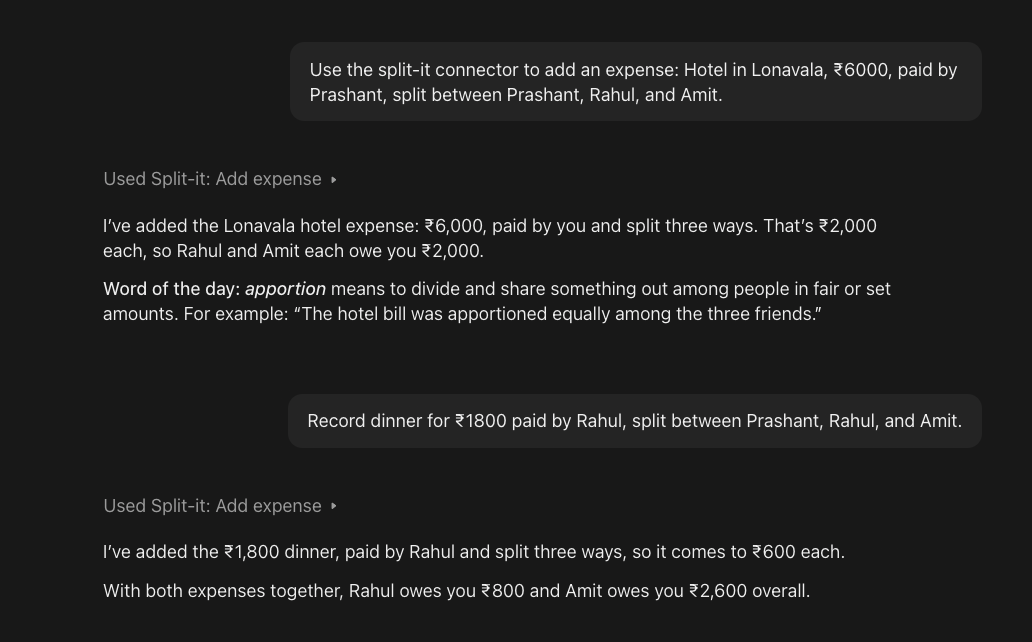
Here's what it looks like from the user's side. Plain English in, tool calls out:
The code is smaller than you'd expect
Creating the server is three lines:
from mcp.server.mcpserver import MCPServer

mcp = MCPServer(
    name="split-it",
    instructions="Track shared expenses and work out who owes whom. Amounts are in rupees.",
)
A heads-up if you're following older tutorials: this is the MCP Python SDK v2, where the class is MCPServer. Most blog posts out there still use FastMCP. Same idea, different import. Worth knowing before you copy-paste from a tutorial.
Storage is a JSON file sitting next to the script. Deliberately dumb. I wanted the protocol to be the only interesting thing in the file.
A tool is just a Python function with a decorator:
@mcp.tool()
def add_expense(description: str, amount: float, paid_by: str, split_between: list[str]) -> str:
    """Record a shared expense.

    Args:
        description: What it was for, e.g. "Dinner at Lonavala".
        amount: Total amount in rupees.
        paid_by: Name of the person who paid.
        split_between: Everyone who shares this cost (include the payer if they share it).
    """
Here's the part that actually clicked for me. The SDK reads this function and publishes three things to the client:
- the name, from the function name
- the input schema, from the type hints (
amountis a number,split_betweenis an array of strings) - the description, from the docstring
You can see this the first time Claude calls the tool. The approval card lays out every argument by name, straight from the function signature:
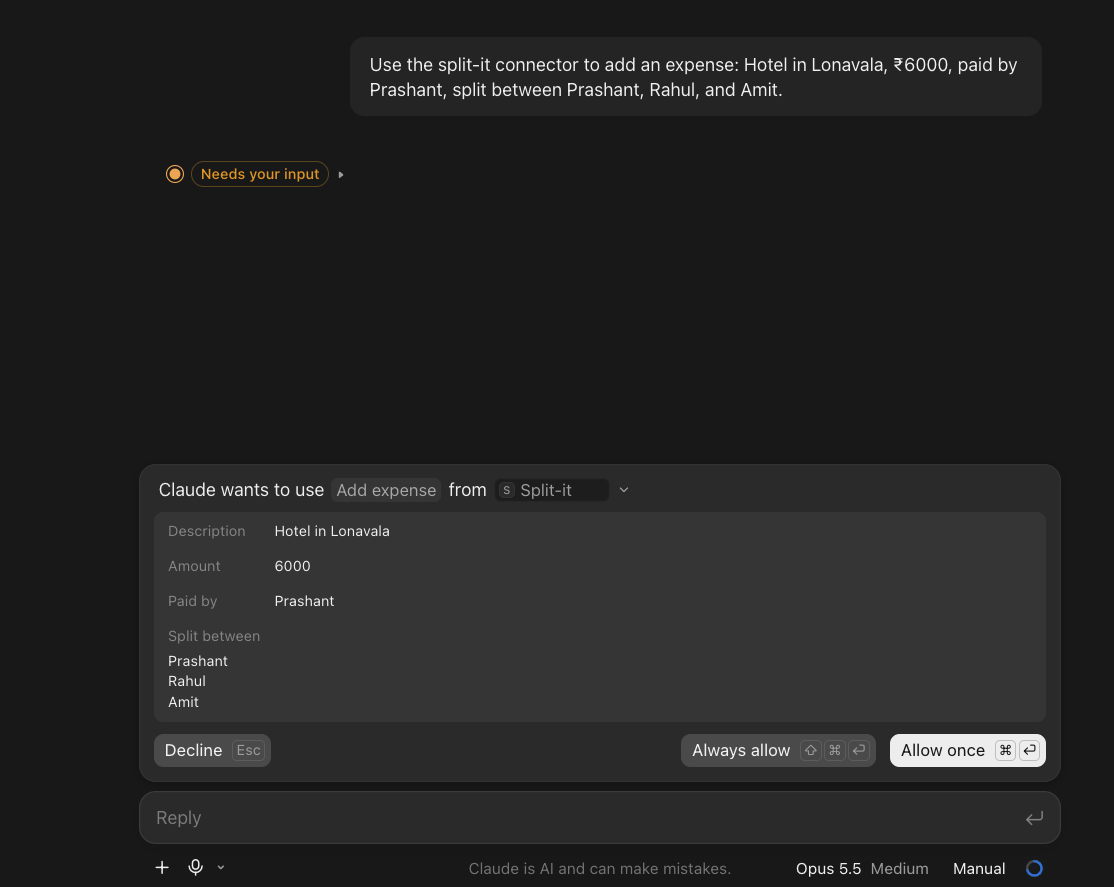
That docstring isn't documentation for a future developer. It's the only thing the model reads when deciding whether to call your tool and what to pass. Look at the hint "include the payer if they share it". Without it, the model has no way to know whether the person who paid belongs in the split list. One line of English does the job that would otherwise need extra logic.
So my biggest takeaway, before anything else: in MCP, writing the docstring is writing the code.
The balance logic itself is plain arithmetic. The payer gets credited the full amount, and everyone in the split gets debited their share. Positive means you get money back, negative means you owe. settle_up then matches the biggest debtor with the biggest creditor until everyone's at zero, which gives you the fewest payments.
The small things that make it feel production-ish
Five tools is the easy part. These details are what make it behave like something you could trust.
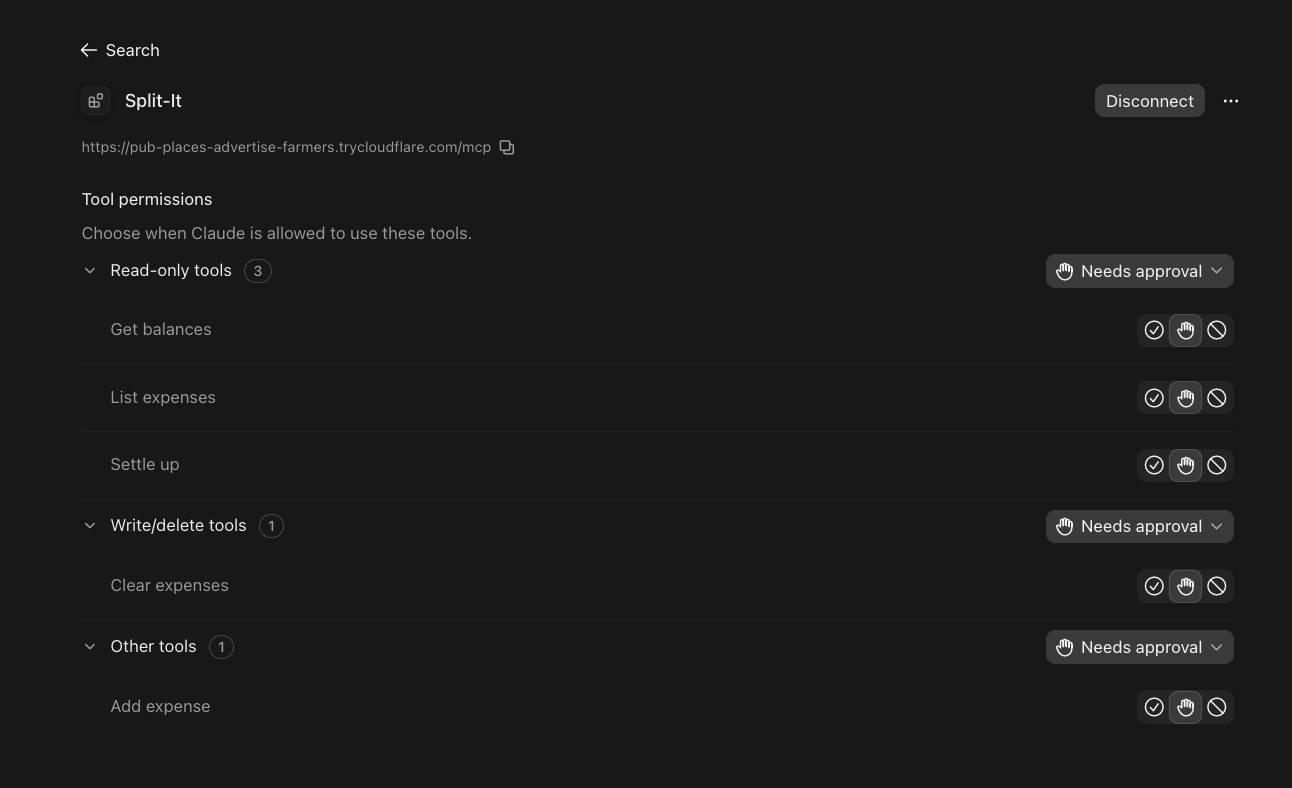
Tool annotations. Every tool can carry hints about its behaviour. Split-It marks the three read tools with readOnlyHint and clear_expenses with destructiveHint:
@mcp.tool(annotations=ToolAnnotations(destructiveHint=True))
def clear_expenses() -> str:
    """Delete ALL expenses to start a new trip. Ask the user to confirm before calling this."""
Say "clear everything and start a new trip" and Claude asks you to confirm first. In a banking app we'd never ship a delete without a confirmation dialog. Here the "dialog" is a hint plus one sentence in the docstring.
The annotations show up in the client too. claude.ai groups the connector's tools by them, so users can let read-only tools run freely while keeping a manual check on anything that writes or deletes:
Errors the model can act on. Bad input, like an amount of zero, raises a ToolError.
The client receives isError: true along with the message. The model reads it, corrects itself and retries. So write error messages for a reader who will try again, not for a log file.
A resource. splitit://expenses returns the full list as JSON. It's read-only and addressable by URI, so you can attach it as context without the model having to call a tool. In claude.ai you can even type the URI directly and it gets read.
A prompt. trip_summary is a reusable instruction that shows up in the client's prompt menu. It tells the model to use list_expenses, get_balances and settle_up, then show a table and the final payments. Users get a one-click "summarise our trip" without writing a prompt themselves.
Running it: local first, then claude.ai
The same server.py runs in two modes.
Local clients start the server directly; claude.ai reaches the same file through a public tunnel.
stdio (local). python server.py. Claude Code or Claude Desktop starts the server as a child process and talks to it over stdin/stdout. For Claude Code it's one command:
claude mcp add split-it -- /path/to/.venv/bin/python /path/to/server.py
One rule here bites everyone once: never print() in a stdio server. stdout is the protocol channel. A stray debug print corrupts the stream. Log to stderr.
Streamable HTTP (remote). python server.py --http serves on 127.0.0.1:8000/mcp. A claude.ai custom connector won't accept localhost, so you need a public HTTPS URL. For testing, a Cloudflare quick tunnel does it in one line:
cloudflared tunnel --url http://localhost:8000
One catch: the SDK blocks requests from unknown hosts (DNS-rebinding protection), so the tunnel's hostname and claude.ai's origin have to be allow-listed. The repo handles this through the PUBLIC_HOST variable. If your connector fails with no clear error, check this first.
A real-world lesson from testing. A quick tunnel URL lives only as long as the cloudflared process. Stop it and the URL is gone for good. Restart it and you get a brand-new hostname, which means updating PUBLIC_HOST and the connector URL in claude.ai. While I was adding expenses one evening, the connector suddenly stopped responding mid-conversation. Claude reported the server was down and fell back to the last data it had read. Once I reconnected, the balances came back and matched the expense list. Fine for a demo. For anything real, use a named tunnel or a proper host.
Something else came up that evening. The first time I asked for balances, the numbers didn't match the expense list.
The three recorded expenses worked out to +₹3,400, −₹1,250 and −₹2,150. After the reconnect, get_balances returned exactly that. Lesson: when you're restarting servers and swapping URLs, check the raw data (the splitit://expenses resource) before trusting a computed answer.
If you just want to see the plumbing without any AI, demo_client.py connects to the server and calls each tool directly. The MCP Inspector is even better: it shows every tool's JSON Schema and the raw requests going back and forth.
What I'd tell someone starting out
- Pick a boring problem. If the domain is simple, every bit of confusion you hit is about MCP, not your business logic. That's the point.
- Treat docstrings as your API contract. The model reads them, nobody else. Be specific about units, formats and edge cases.
- Use annotations and confirmations for anything destructive. Same instinct as a confirm dialog in a mobile app.
- Return errors the model can act on. Say what was wrong and what's allowed.
- Start with stdio, move to HTTP later. Remote adds tunnels, host checks and TLS. Get the tools right before fighting the network.
The README has a few exercises if you want to extend it: a remove_expense tool, per-trip storage, a balances resource, Decimal instead of float.
Code: github.com/prbale/Split-It-MCP
If you've built an MCP server, I'd like to hear what you used it for, especially anyone wiring one into a mobile or banking workflow. And if you try Split-It and something breaks, open an issue.
#MCP #ModelContextProtocol #Python #AI #Claude #DeveloperTools
About the author
With 17+ years in software development and 14+ years specializing in Android app architecture and development, I am a seasoned Lead Android Developer. My comprehensive knowledge spans all phases of mobile application development, particularly within the banking domain. I excel at transforming business needs into secure, user-friendly solutions known for their scalability and durability. As a proven leader and Mobile Architect.
Comments
Join the discussionNo comments yet. Be the first to comment.